Policy Management
The Policy Management module allows administrators to configure targeted rules for specific use cases. IAM supports a variety of policy types—such as data masking, unique user rules, password policies, lockout rules, notification templates, and default app redirects—enabling enterprises to meet complex operational and security requirements.
Unique User Identifier
Configure policies to enforce user uniqueness based on custom attributes.
| No. | Configuration | Description |
|---|---|---|
| 1 | User Group | Defined in Identity Management > Group Management. |
| 2 | Optional Fields | Select active attributes from the idt_user table in System Settings > Metadata.If multiple attributes are added, uniqueness is validated using an AND logic. |
Common Use Cases
| No. | Scenario | Description |
|---|---|---|
| 1 | Create User | When creating a user, IAM checks if the selected fields are unique. If not, the operation fails. |
Example:
- A policy is created for Group A with attributes
aandb. - A new user X is added to Group A.
- IAM checks for unique combination of
aandb. If not unique, creation fails.
User Profile Completion
Requires the [CIAM] module.
This policy ensures that users complete required fields during login if their profiles are incomplete.
| No. | Configuration | Description |
|---|---|---|
| 1 | Application | Applications defined in Application Management > App Configuration. |
| 2 | Scope Type | Choose from: - User Group (Group Management) - User Type (User Type) - All Users |
| 3 | Scope Selection | Select group/type as per scope type. |
| 4 | Required Fields | Specify which fields users must complete. |
| 5 | Linked Page | Select a page from Customization > Form Designer. A default form (e.g., email) is available. |
When Triggered
| No. | Scenario | Description |
|---|---|---|
| 1 | User Login | On login, if required fields are missing, user is redirected to complete them. |
Priority
If a user matches multiple policies, the one with the highest priority (lowest sort order) takes effect.
Example
- Configure a form in [Form Designer] for name, email, and mobile.
- Create a policy for App A and apply it to "All Users".
- Create User A without name/email/mobile.
- Assign an account for App A to User A.
- When User A logs in to App A, IAM prompts for profile completion via the configured form.
Password Policy
IAM allows enterprises to define rules for password strength, expiry, recovery options, and initial password generation.
Password Rule
| No. | Configuration | Description |
|---|---|---|
| 1 | User Group | From Group Management. |
| 2 | Custom Rules | Define allowed characters, length, exclusions (e.g., spaces, repeats). Advanced: Use regex for custom patterns. |
| 3 | Password Tester | Test a password against the current rule set. |
| 4 | Login Behavior | Define behavior when login password does not match rule. |
| 5 | Lifecycle | Set password validity period and expiration alerts. |
| 6 | Recovery Options | Set how users can reset/recover passwords. |
Password Rule Enforcement
| No. | Scenario | Description |
|---|---|---|
| 1 | Login | Check rule compliance, expiry status. If forced, prompt user to update. |
| 2 | Notifications | Notify users X days before expiry (via email or popup). |
| 3 | Password Reset | Apply rules when users attempt to reset. |
| 4 | Password Change | Validates against the configured rules. |
Priority: Higher number = higher priority. If a user belongs to multiple groups, the highest priority rule applies.
Initial Password Rule
Defines how initial passwords are generated for new users.
| No. | Configuration | Description |
|---|---|---|
| 1 | User Group | Defined in Group Management. |
| 2 | Password Strategy | Use SQL-based expressions to generate dynamic initial passwords. |
Priority: Highest-priority rule (largest value) takes precedence.
Account Lockout
Configure policies to lock users after a defined number of failed login attempts.
Common Use Case
| No. | Scenario | Description |
|---|---|---|
| 1 | User Login | Locks the account if failed login attempts exceed the threshold. |
Priority: Higher number = higher priority when multiple policies apply.
Data Security
Display Masking
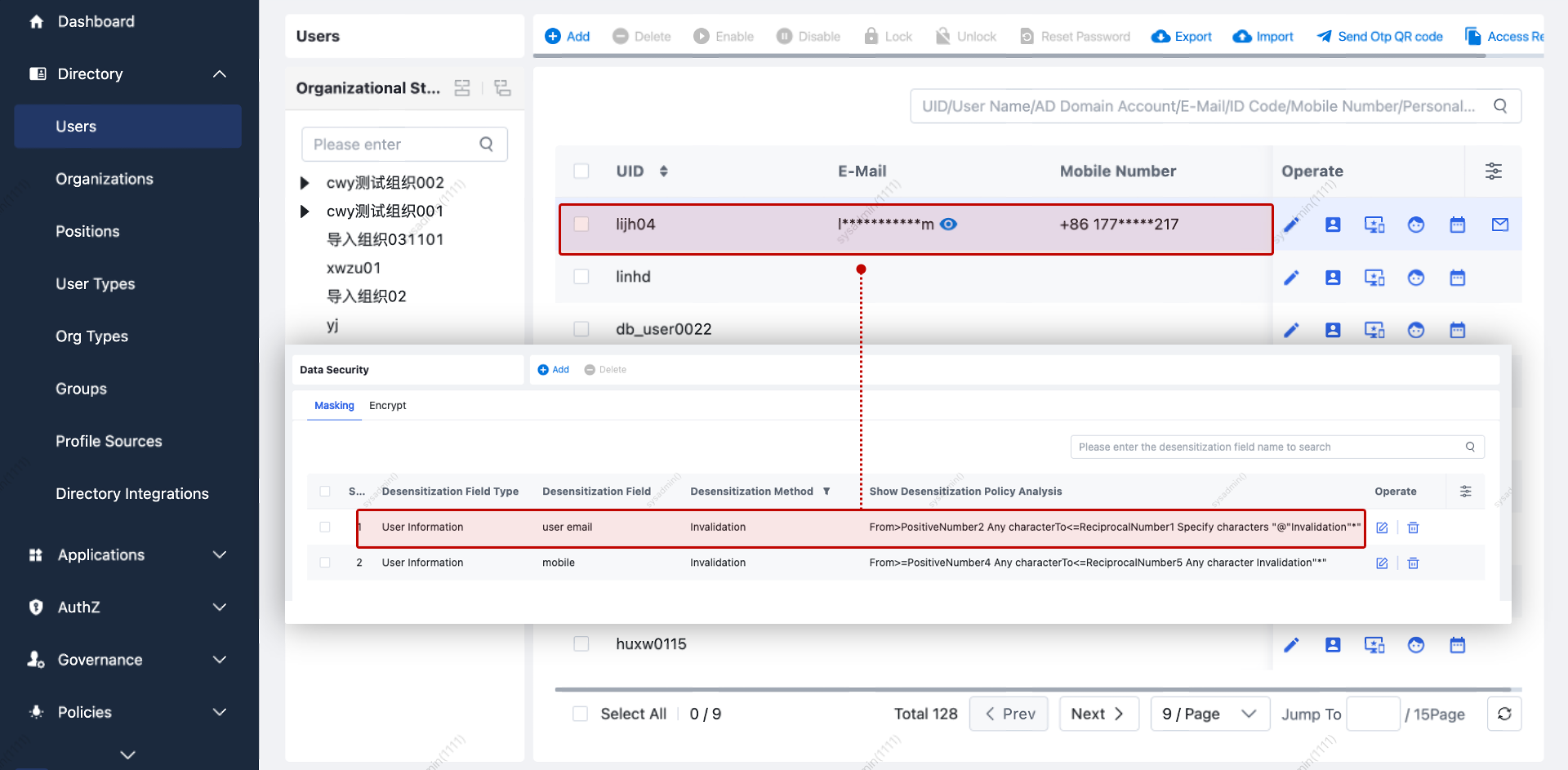
Used to mask sensitive user attributes (e.g., display phone as 130****1234).
| No. | Configuration | Description |
|---|---|---|
| 1 | Applicable Roles | Roles defined in Platform Permissions > Role Management. Note: A user must have only roles with masking applied for the policy to be enforced. |
| 2 | Masking Method | Supports: Nullify, Random Value, Replace. |
| 3 | Masking Range | Define which characters to mask (e.g., first 5 digits, last character, etc.). |
| 4 | View Plaintext | Allow users to view original value via an "eye" icon (audited). |
Example: Masking Behavior
| No. | Scenario | Description |
|---|---|---|
| 1 | View Masked Data | Users see masked data; can click the “eye” to reveal (audited). |
| 2 | View Audit | Audit logs record reveal actions. |

Storage Encryption
Encrypt selected fields before storing in the database.
⚠️ Notes:
- Encrypted fields cannot be sorted or searched via fuzzy matching.
| No. | Configuration | Description |
|---|---|---|
| 1 | Encrypted Fields | Select user attributes to encrypt. |
| 2 | Encryption Algo | Configured in System Settings > Security > Field Encryption. |
Effect: During user creation/editing, encrypted fields are stored using the configured algorithm.
Deletion: Deleting the encryption policy decrypts affected fields.
Notification Policies
The notification module allows configuration of messages, channels (email, SMS, WeCom, etc.), and recipients based on predefined scenarios.
Notes:
- Notification types are fixed. For custom ones, contact support.
- All notification channels must be configured under System Settings > Notification Interfaces.
Common Notification Codes
| Code | Scenario Description |
|---|---|
| outer_verify_code_login | Send OTP during login or step-up authentication. |
| outer_unbind_password_back | OTP for self-service unbinding. |
| outer_bind_password_back | OTP for self-service binding. |
| outer_forget_password | OTP for password recovery. |
| send_sms_code | Generic OTP dispatch. |
| user_add / disable / enable | Notification for user lifecycle events. |
| user_expired / will_expire | Expiration alerts. |
| notice_empty_account | Platform orphan account alert. |
| notice_zombie_account_* | Alerts for inactive or duplicate accounts (platform/app level). |
| mfa_risk_alert | Alert admins when MFA risk is triggered. |
| mfa_operation_warning_alert | Alert for suspicious MFA behavior. |
| send_offline_otp_code | Offline OTP dispatch. |
| sync_first_level_error_to_admin | Sync failure alerts (full failure). |
| sync_info_to_admin | Sync partial failure alerts. |
Configure Notification Policy
- Choose scenario.
- Set recipients, channel(s), and message template.
- Variables must be formatted as
${}.
Example Setup
- Upload plugins via System Settings > Plugin Management (optional if using built-in).
- Configure interface in Customization > Notification Methods.
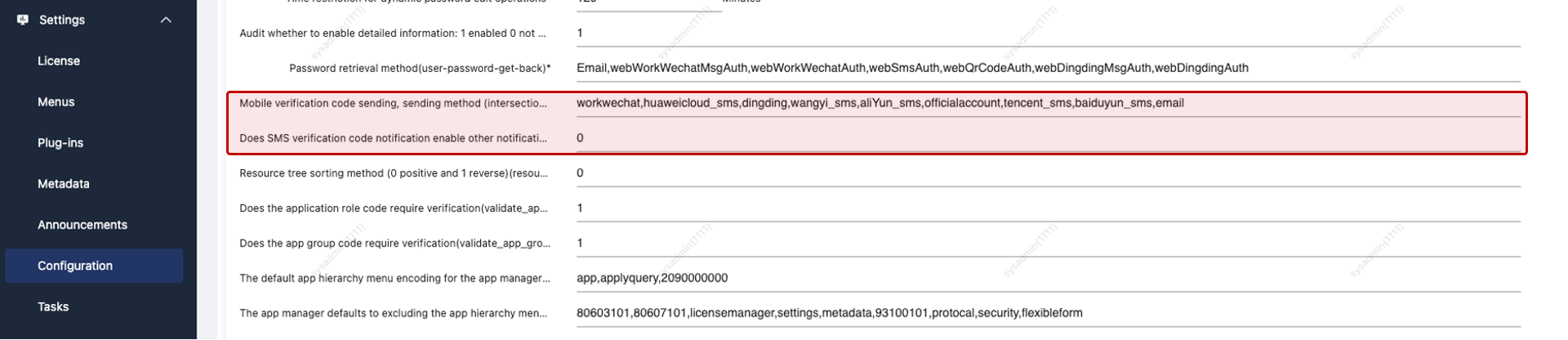
- Adjust parameters in System Settings > System Parameters.
- Define template content and target recipients.
| Setting | Description |
|---|---|
| Send Method | Determines eligible delivery channels for the notification. |
| Broadcast | If set to 0, only SMS is effective—even if other methods are selected. |
Default Application
Define a landing application for specific user groups after login.
| No. | Configuration | Description |
|---|---|---|
| 1 | User Group | Defined in Group Management. |
| 2 | Redirect URL | URL to redirect after successful login instead of the default portal. |
Multi-Device Policy
Controls whether the same user account can log in from multiple devices simultaneously.
| No. | Configuration | Description |
|---|---|---|
| 1 | Priority | Higher number = higher priority. |
| 2 | User Scope | Can be scoped by user, user type, organization, position, or role. |
| 3 | Concurrent Device Policy | Options: 1. Allow concurrent logins on multiple devices. 2. Disallow (PC/mobile tracked separately). Note: PC and mobile are treated as separate categories. |
Enforcement Behavior
| No. | Scenario | Description |
|---|---|---|
| 1 | User Login | System determines device concurrency status and applies rules accordingly. |