Authorization Center
This feature is available if you have purchased the [Lifecycle Management] or [IGA – Identity Governance] module. Administrators can use this module to define custom authorization models, policies, and rules for fine-grained access control on the IAM platform, supporting complex enterprise access management scenarios.
Permission Model
The Permission Model defines how entitlements are bundled (as permission packages), how user and application scopes are defined, and how permissions are automatically provisioned or requested.
| No. | Configuration Item | Description |
|---|---|---|
| 1 | Model Type | Defines the category used when users request permission packages in the portal. Default options include: Role-based, Position-based, Organization-based, Attribute-based, Business Unit-based, and Public permissions. You can manage model types under System Settings → Permission Model Types. |
| 2 | Business Owner | Allows owners to view and manage their responsible permission packages in the portal. |
| 3 | IT Owner | Reserved field for marking IT responsibility; currently no specific function. |
| 4 | Provisioning Info | Permissions configured here will be used by the Authorization Center → Account Provisioning module. |
| 5 | Workflow Permissions | Permissions configured here will be presented as permission packages for user requests via the portal. Note: Approval workflows depend on the Workflow Engine. Ensure that the System Settings → Workflow Engine is configured. To use ParaFlow (our custom workflow engine), the ParaBPM module must be purchased. |
Deactivating a Permission Model
The following operations are impacted when a permission model is deactivated:
| No. | Operation | Description |
|---|---|---|
| 1 | Access Request | Deactivated models will not be visible in the portal during permission requests. |
| 2 | Provisioning | Deactivated models will not appear in new provisioning policies. Existing policies using the model will also be disabled. |
Permission View
Displays the permissions configured within a permission model. You can easily understand what entitlements are associated with the model.
| No. | View Type | Description |
|---|---|---|
| 1 | List View | Shows associated permissions in a table format |
| 2 | Topology View | Displays associated permissions in a tree structure |
Account Provisioning
Configure account provisioning policies so that when a user's lifecycle changes (e.g., creation, update, deactivation), account information is automatically synchronized to downstream application systems. This ensures smooth access without requiring manual account setup.
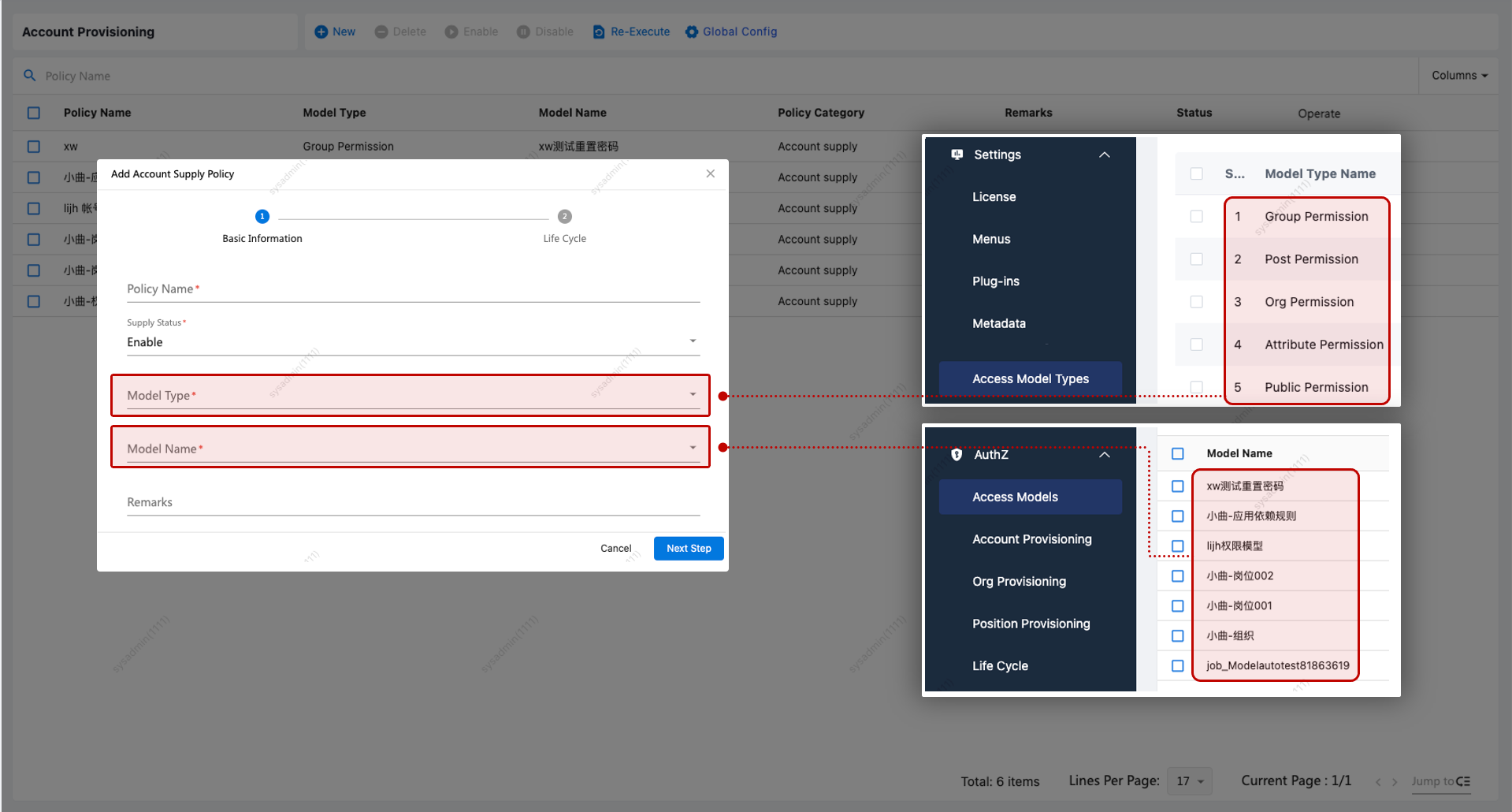
| No. | Configuration Item | Description |
|---|---|---|
| 1 | Model Type | Required. This is sourced from the list of defined permission model types. |
| 2 | Model Name | Lists all enabled permission models of the selected type for selection. |
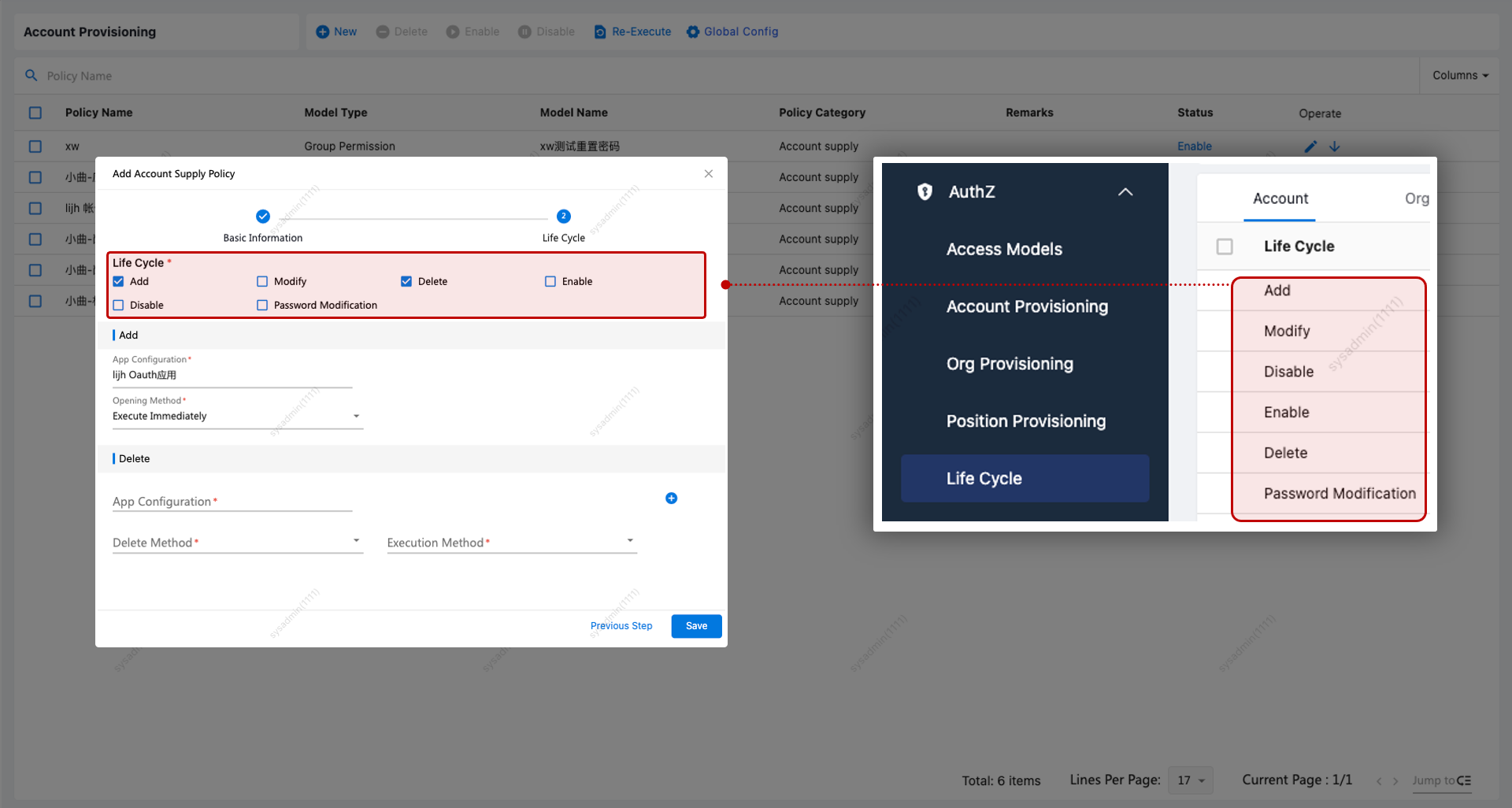
Lifecycle Events: Defined under provisioning policies. The system comes with built-in lifecycle actions: Create, Update, Disable, Enable, Delete, and Password Change. You can also define custom lifecycles.
| No. | Lifecycle Event | Description |
|---|---|---|
| 1 | Create | When a user is created, accounts for all applications associated with the selected permission model are provisioned. |
| 2 | Update | When a user is updated, the account info is automatically synchronized to the selected applications. Note: This only applies if the user already has an account in the application. |
| 3 | Delete | When a user is deleted, their accounts in the selected applications are either deleted or disabled accordingly. |
| 4 | Disable | When a user is disabled, their accounts in the selected applications are deleted or disabled. |
| 5 | Enable | When a user is re-enabled, their accounts are automatically enabled in the selected applications. Note: If “Create Account” is set to Yes and the user has no existing account, one will be created. If set to No, no action will be taken. |
| 6 | Password Change | When a user successfully changes their password, the update is synchronized to their accounts in the selected applications. |
Policy Priority
Provisioning policies can be prioritized. If multiple policies match a user, and the lifecycle event and application are the same, only the policy with the highest priority will be executed.
Global Provisioning Policy
When a user is deactivated or deleted, their remaining application accounts will follow the global provisioning policy.
If a user update causes them to no longer meet policy conditions, this policy defines how to handle their accounts and permissions in the affected applications.
Application Dependency Rules
In cases where application accounts are interdependent (e.g., an Exchange account requires an AD account first):
| No. | Operation | Example |
|---|---|---|
| 1 | Create/Enable | Users will be prompted to activate AD accounts before Exchange accounts |
| 2 | Disable/Delete | Users must disable/delete Exchange accounts before AD accounts |
| 3 | Permission Model | Warnings are shown based on configured dependency rules |
| 4 | Provisioning Rule | Warnings are shown based on configured dependency rules |
Configuration Walkthrough
To meet a use case where updates to users in a certain organization should trigger synchronization to the OA system, follow these steps:
-
Create Organization: e.g., Organization A
-
Create Application: e.g., OA Application, enable data sync and associate the OA plugin
-
Create Permission Model:
- Model type: Organization-based
- Scope: Select Organization A
- Associated application: OA
- Optional: bind permissions during provisioning
-
Create Provisioning Policy:
- Link it to the permission model
- Lifecycle events: Select Create and Update
-
Verify Outcome:
- Create a user under Organization A
- Confirm records appear in Synchronization Logs after create and update actions
Organization Provisioning
You can configure which operations on organizations trigger provisioning. Unlike account provisioning, organization provisioning is based on organization structures and not linked to permission models.
| No. | Lifecycle Event | Description |
|---|---|---|
| 1 | Create | Creates a new organization in the target application when a new one is created in IAM. (Note: “Include Sub-orgs” must be selected during policy configuration.) |
| 2 | Update | Updates the organization data in the selected application when an org is modified |
| 3 | Delete | Deletes the organization from the target application when deleted in IAM |
| 4 | Disable | Disables the organization in the target application |
| 5 | Enable | Enables the organization in the target application |
Position Provisioning
Position provisioning is similar to organization provisioning but targets position groups and is also independent of permission models.
| No. | Lifecycle Event | Description |
|---|---|---|
| 1 | Create | Creates a new position in the target application |
| 2 | Update | Updates the position in the target application |
| 3 | Delete | Deletes the position from the target application |
| 4 | Disable | Disables the position in the target application |
| 5 | Enable | Enables the position in the target application |
Re-Execution
The Re-Execution feature is designed for "catch-up" actions. If data was created after a provisioning policy was configured and still needs to be provisioned to downstream systems, this function will trigger provisioning based on existing configurations. Re-execution applies only to the Create lifecycle.
Execute All
| No. | Configuration Item | Description |
|---|---|---|
| 1 | Execution Type | Select whether to execute Account, Organization, or Position provisioning |
| 2 | Application | Select the target application Note: The application must be associated with an existing provisioning policy |
| 3 | Push to Application | If enabled, data will be pushed to the application if synchronization is turned on; if disabled, no data will be pushed |
Example:
- Create a permission model associated with Organization A and Application A (sync enabled), and bind permissions
- Create a provisioning policy linked to the model, and select Create lifecycle
- Create User 01 in Organization A
- Use “Execute All” with type = User, application = App A, and enable “Push to Application”
- User 01 will automatically be provisioned and granted permissions in App A
Execute by Organization
| No. | Configuration Item | Description |
|---|---|---|
| 1 | Execution Type | Choose to execute Account, Organization, or Position provisioning |
| 2 | Application | Target application (must be linked to a provisioning policy) |
| 3 | Push to Application | Controls whether data is actually pushed when sync is enabled |
| 4 | Include Sub-orgs | Yes = includes sub-organizations in execution No = executes only on selected orgs |
Execution Records
Re-execution tasks are run on a scheduled basis. After choosing “Execute All” or “Execute by Organization,” the task enters a Pending state and runs at the next scheduled time. Once executed, detailed logs will be available in the task view.
Lifecycle Management
Lifecycle data is shared across Account, Organization, and Position provisioning. Each has its own submodule with specific lifecycle event definitions.