Identity Management
User Management
This module provides functions for user onboarding (creation), batch import/export, status management (enable/disable, lock/unlock), permission cloning, convenient user operations (password reset, sending offline OTP QR code, sending passcodes), and fine-grained permission and access management. It also offers a comprehensive user profile and lifecycle data to meet the needs of complex user management across industries and scenarios.
Initial Configuration
Identity Source Configuration
Three types of identity sources are supported:
| No. | Source Type | Description |
|---|---|---|
| 1 | Identity Source Sync | Synchronize users from external systems, such as HR or AD. See Identity Source Management. |
| 2 | Backend Creation | Manually create users in the IAM admin console (create, import, orphan account generation). |
| 3 | User Registration | If the [CIAM] module is enabled, users can register themselves. Prerequisites: 1. Enable registration in Platform Configuration. 2. Configure registration link in Login Page. 3. Define registration form in Registration Page. |
User List Configuration
On the Identity Management > User Management page, the attributes displayed and searchable can be configured via Customization > Page List. Filtering by status, user type, etc., is also supported.
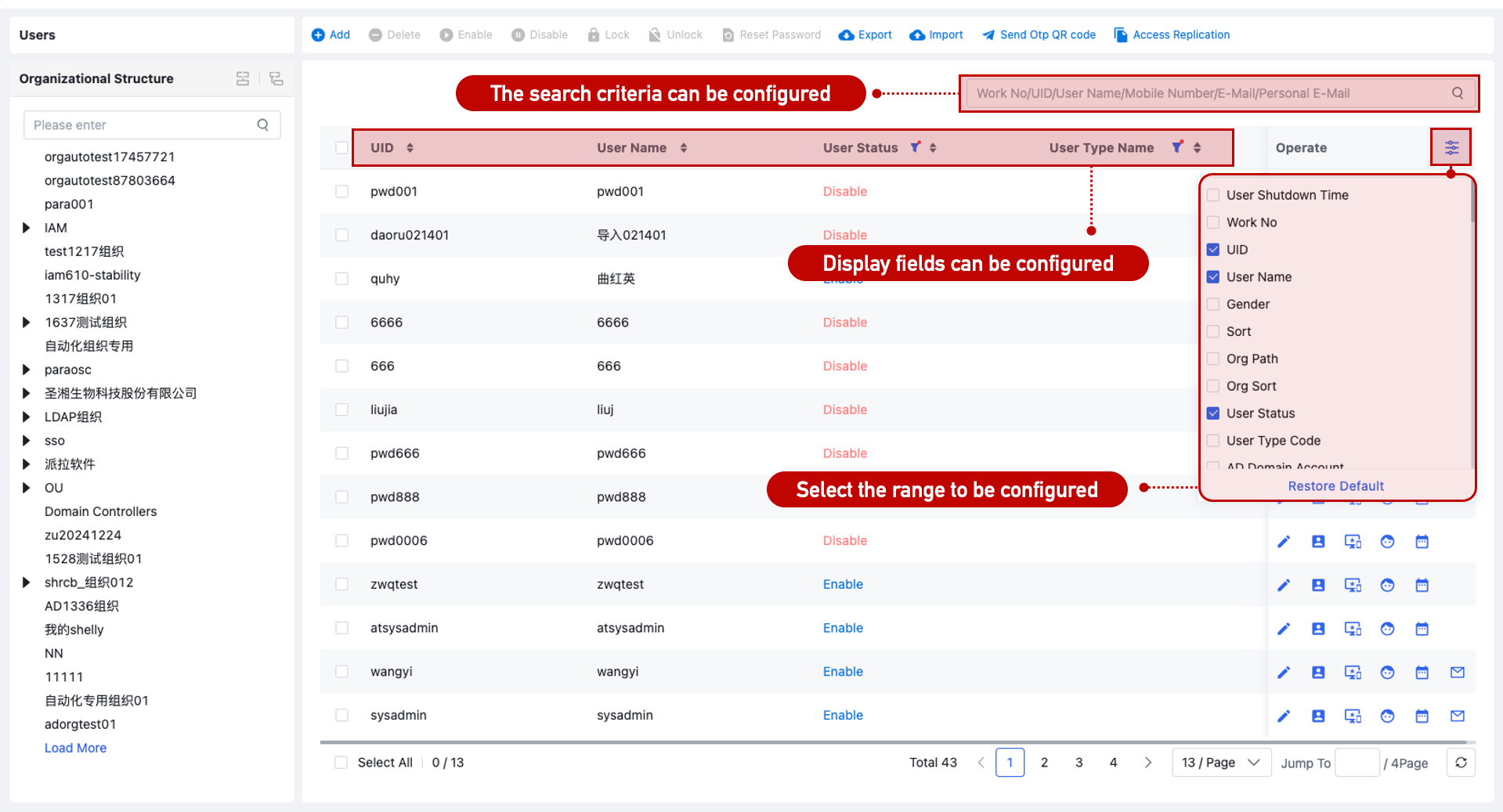
The user organization tree supports options such as showing job positions and sorting order, configurable under System Settings > Display Configuration.
User Form Configuration
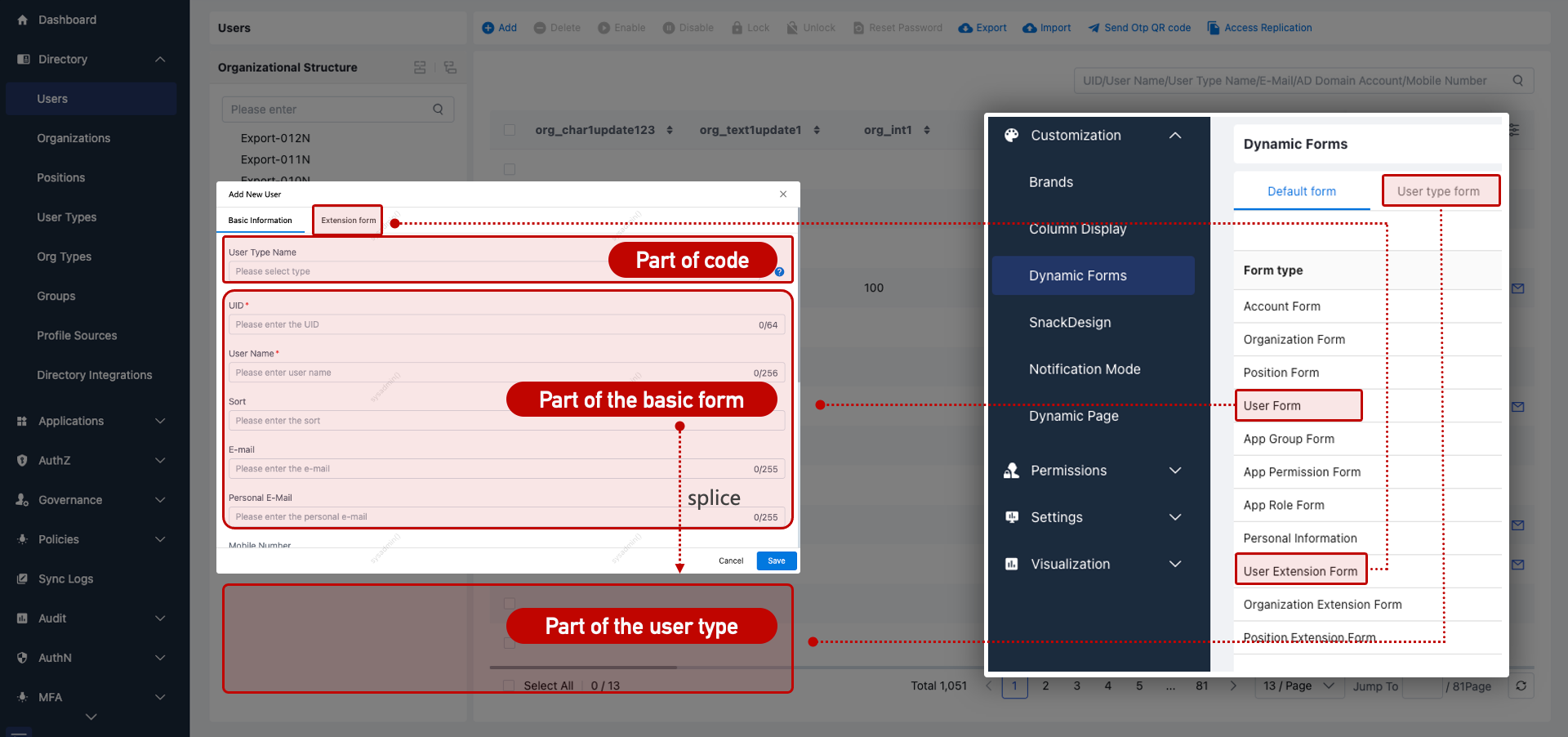
Different user types can load different user forms via Customization > Dynamic Forms.
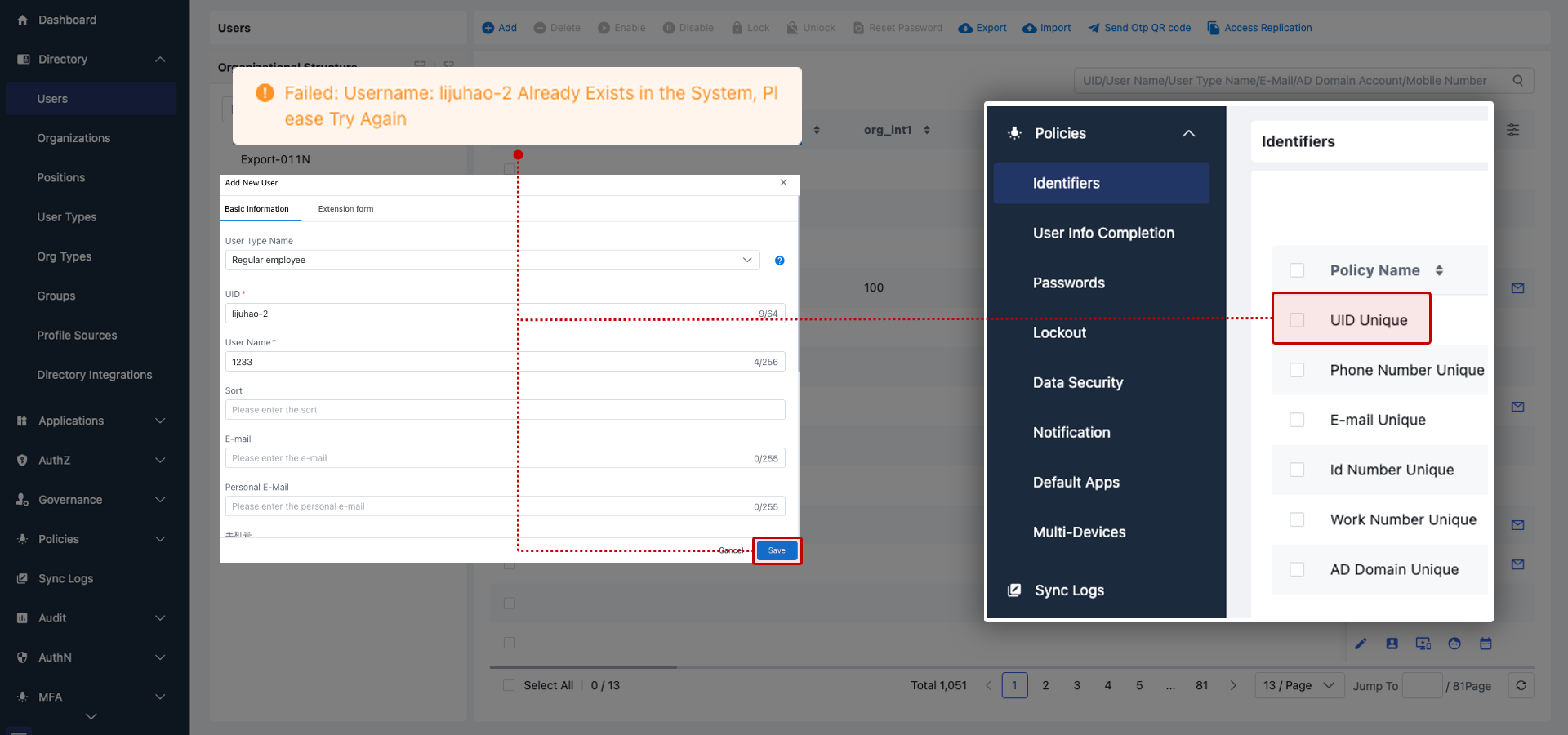
A unique user attribute can be configured and validated upon saving via Policy Management > Unique Identifier.
Create User
Users can be created through the following methods:
| No. | Method | Description |
|---|---|---|
| 1 | Identity Source Sync | Automatically created in IAM when upstream systems create users. |
| 2 | Manual Creation | Use the Create function to add users manually. |
| 3 | Import | Use the Import function to batch import users. |
| 4 | Orphan Account Creation | Use the Orphan Account Generation function. |
| 5 | User Registration | Users self-register using a registration form. |
Associated operations:
| No. | Operation | Description |
|---|---|---|
| 1 | Notification | Notifications (e.g., email) can be sent upon user creation. See Notifications. |
| 2 | Auto-disable on Expiry | Expiration time is auto-filled based on user type settings and creation time. IAM can auto-disable users upon expiry. See Notifications. |
| 3 | User Numbers | Both user ID and organization-specific ID are supported. Sorting preferences are configurable. |
If the [Lifecycle Management] module is enabled, user creation will automatically trigger account provisioning in downstream applications. See Authorization Center.
Enable/Disable Users
This function is used when accounts are temporarily inactive or returning to use.
| No. | Method | Description |
|---|---|---|
| 1 | Identity Source Sync | Upstream system disables/enables the user, and IAM syncs the changes. |
| 2 | Manual Operation | Use the Enable/Disable actions manually. |
| 3 | Expired User Type | IAM automatically disables the user upon user type expiration. |
| 4 | Identity Governance | Use Identity Governance rules to auto-disable users. |
Associated operations:
| No. | Operation | Description |
|---|---|---|
| 1 | Notification | Notifications can be triggered. See Notifications. |
| 2 | Login Access | Disabled users cannot access the IAM platform. |
If [Lifecycle Management] is enabled, status changes are propagated to downstream systems. See Authorization Center.
Lock/Unlock Users
Used in scenarios such as account compromise or multiple failed login attempts.
| No. | Method | Description |
|---|---|---|
| 1 | Manual Locking | Use the Lock action manually. |
| 2 | Failed Login Attempts | Auto-lock triggered based on password retry policy. See User Lock Policy. |
| 3 | Identity Governance | Use Identity Governance policies to auto-lock accounts. |
Associated operations:
| No. | Operation | Description |
|---|---|---|
| 1 | Notification | Notifications can be triggered. See Notifications. |
| 2 | Login Access | Locked users cannot log into the platform. |
Delete User
Deletes the user record permanently.
| No. | Method | Description |
|---|---|---|
| 1 | Identity Source Sync | Upstream delete is synced via standard plugins. |
| 2 | Manual Operation | Use the Delete action manually. |
| 3 | Identity Governance | Use Identity Governance to auto-delete users. |
If [Lifecycle Management] is enabled, deletion is propagated to downstream apps. See Authorization Center.
Reset User Password
Two reset options are available:
| No. | Reset Method | Description |
|---|---|---|
| 1 | Initial Password | Based on the Initial Password Policy. |
| 2 | Random Password | Random password displayed in plaintext for admin to copy. |
Associated operations:
| No. | Operation | Description |
|---|---|---|
| 1 | Notification | Notification can be triggered. See Notifications. |
Send Offline OTP QR Code
Admins can send offline OTP QR codes to users in bulk to facilitate device binding.
Settings:
| No. | Option | Description |
|---|---|---|
| 1 | Code Validity Period | See Authentication Settings > OTP for configuration. |
| 2 | Device Limit | Maximum number of devices a user can bind. |
Permission Cloning
If the [IGA] module is enabled, admins can clone permissions from one user to another, useful when users share similar access needs.
Permission Management
Summarized view of all resources linked to a user:
| No. | Resource Type | Description |
|---|---|---|
| 1 | Application Accounts | If [Lifecycle Management] is enabled, shows all app accounts linked to the user. |
| Ensure App Sync Info is configured to enable syncing. | ||
| 2 | Roles | All IAM roles assigned to the user. |
| 3 | Groups | User’s group memberships. |
| 4 | Linked Accounts | Third-party accounts like WeChat Work, DingTalk, etc. |
| 5 | OS Accounts | If [OS Authentication] is enabled, shows linked OS accounts. |
| Ensure OS Configuration is completed for management and collection. | ||
| 6 | Organizational Lead | Shows all organizations managed by the user as a supervisor. |
Access Management
In the event of unusual login or access behavior, admins can sign the user out of all active sessions and applications to ensure security.
User Profile
A comprehensive dashboard showing user details including basic information, access logs, platform/application permissions, account changes, and behavior analytics.
User Lifecycle
If [Lifecycle Management] is enabled, the user lifecycle view displays a timeline of the user’s activity logs for audit and review.
Send Passcode to Email
Admins can send an OTP passcode to the user’s corporate email to assist with login.
User Types
For organizations with complex workforce structures (e.g., permanent, contract, outsourced, vendors), IAM allows classification using User Types.
Initial Configuration
User Type Source
Only backend creation is supported.
User Type List Configuration
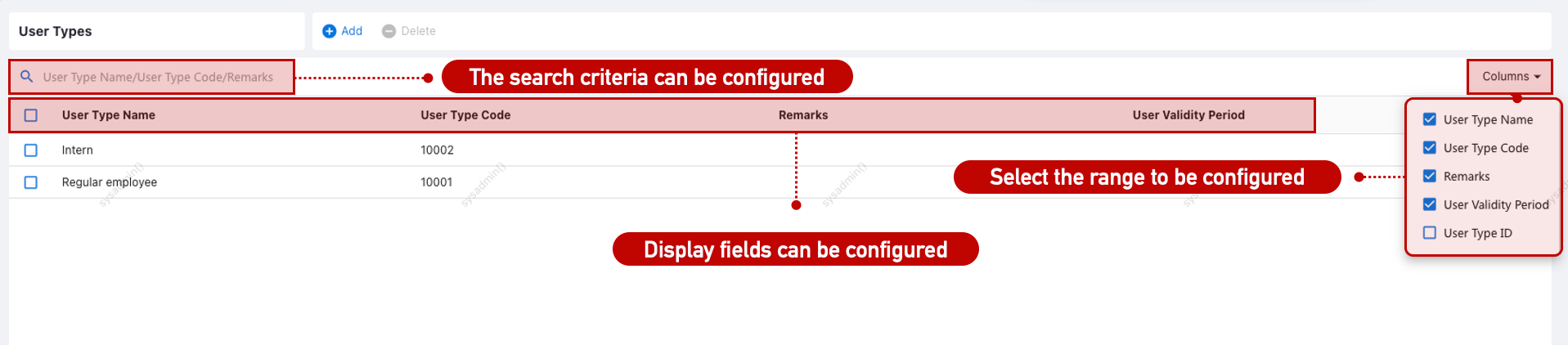
Configure visible/searchable fields via Customization > Page List.
User Type Form Configuration
Not supported.
User Form Design
You can define custom attributes for different user types (e.g., internal users need employee ID and phone; visitors require ID number, mobile, and company info).

Organization Management
The Organization Management module in IAM supports organizational transfers, merges, batch import/export, organizational leadership configuration, position association, and more. The tree-structured organization hierarchy accommodates complex models such as headquarters, branches, and subsidiaries, enabling flexible organization management for businesses of all sizes.
Initial Configuration
Organization Source Configuration
IAM supports two sources of organization data:
| No. | Source Type | Description |
|---|---|---|
| 1 | Identity Source Sync | Sync with external systems (e.g., HR). See Identity Source Management. |
| 2 | Backend Creation | Create or import organizations manually from the IAM admin console. |
Organization List Configuration
In the Identity Management > Organization Management page, visible and searchable attributes can be configured via Customization > Page List. Filtering by status and type is supported.

Tree display settings, such as sorting order and position display, can be configured under System Settings > Display Configuration.
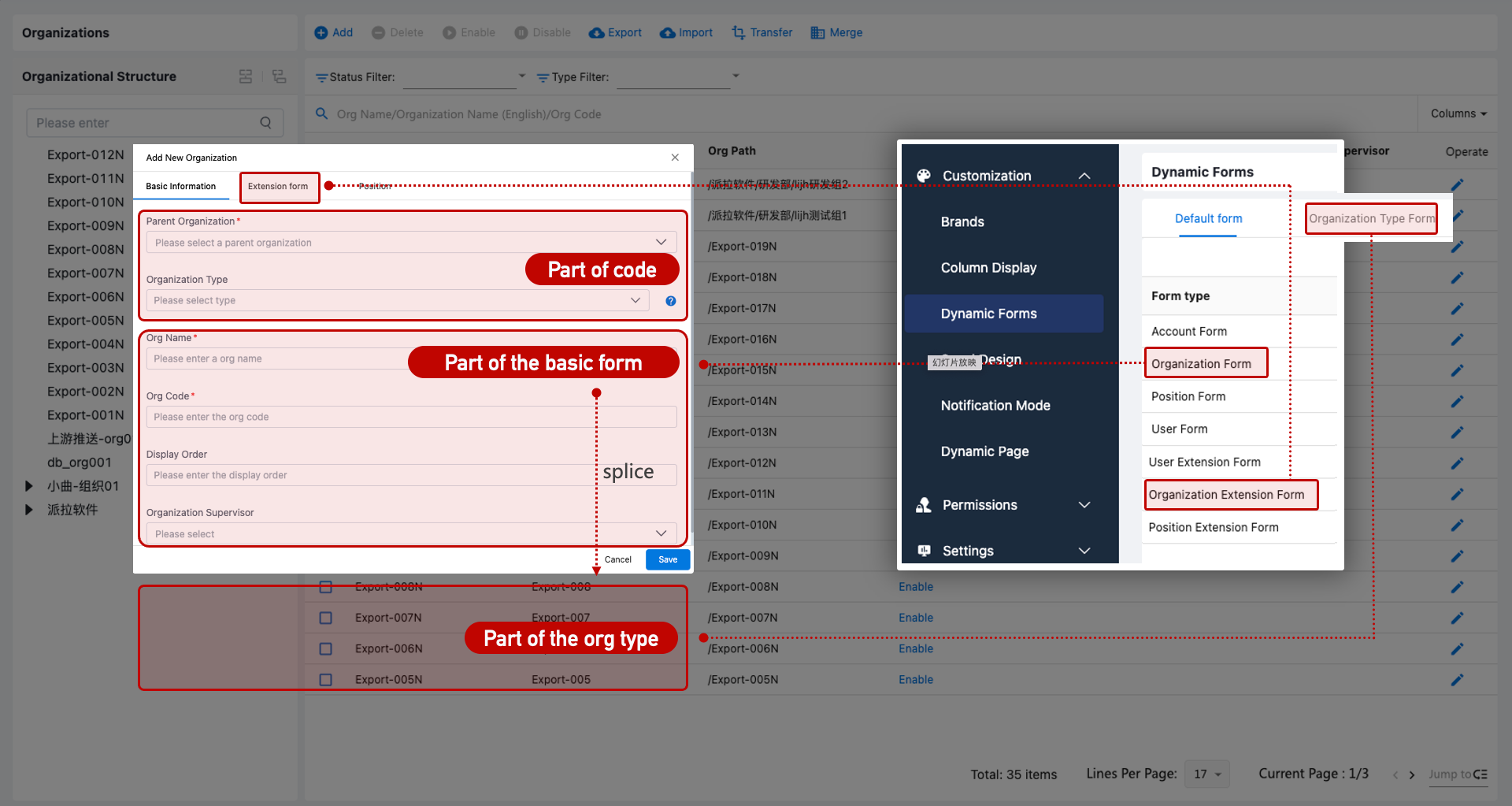
Organization Form Configuration
Different organization types can load different forms, configurable via Customization > Dynamic Forms. During organization creation, the form is selected based on the type.
Create Organization
Organizations can be created using the following methods:
| No. | Method | Description |
|---|---|---|
| 1 | Identity Source Sync | Created in upstream systems and synced to IAM. |
| 2 | Manual Creation | Created manually via the Create function. |
| 3 | Import | Batch imported using the Import function. |
If the [Lifecycle Management] module is enabled, new organizations can be automatically provisioned to downstream systems. See Authorization Center.
Enable/Disable Organization
Used for scenarios where some business units need to be temporarily deactivated or reactivated.
| No. | Method | Description |
|---|---|---|
| 1 | Identity Source Sync | Changes made upstream are synced to IAM. |
| 2 | Manual Operation | Enable/disable organizations using the admin console. |
If [Lifecycle Management] is enabled, changes are synchronized to downstream systems. See Authorization Center.
Delete Organization
Organizations can be manually deleted. This is a physical delete operation and should be done with caution.
| No. | Method | Description |
|---|---|---|
| 1 | Identity Source Sync | Deletions are synchronized through standard plugins. |
| 2 | Manual Operation | Use the Delete function from the admin console. |
If [Lifecycle Management] is enabled, deletion actions are synchronized to downstream systems. See Authorization Center.
Transfer & Merge Organization
When large-scale changes in organizational structure occur, administrators can:
- Use the Transfer Organization function to move one organization under another.
- Use the Merge Organization function to move all sub-organizations from one node to another. The merged (source) node will be deleted after the operation.
This allows efficient reorganization of enterprise structure.
Organization Types
IAM supports the configuration of multiple organization types (e.g., outsourced teams, temporary units, suppliers) along with their specific attribute forms, enabling fine-grained management of enterprise structures.
Initial Configuration
Organization Type Source
Only manual creation in the IAM admin console is supported.
Organization Type List Configuration
List display configuration is not supported.
Organization Type Form Configuration
Custom forms for organization types are not supported.
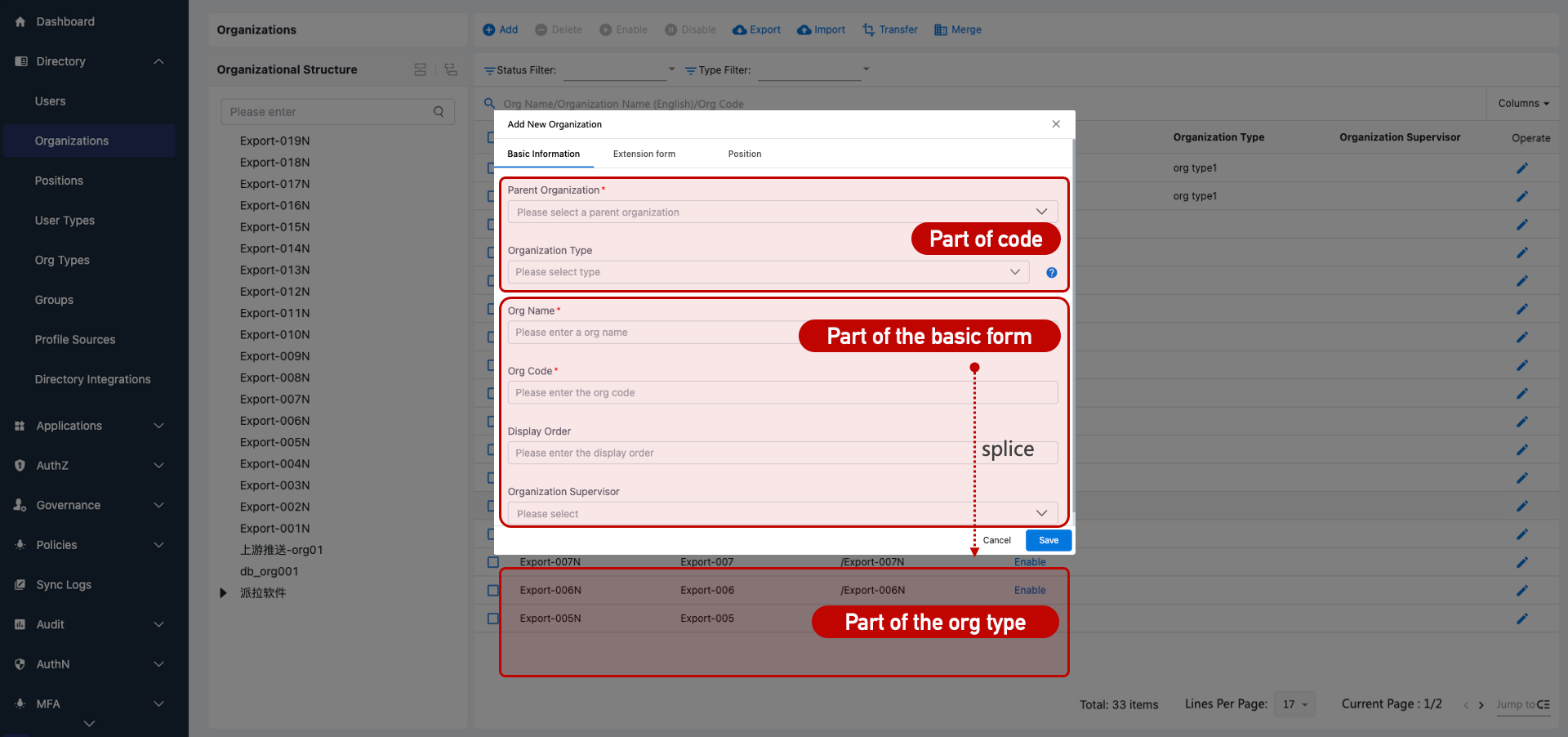
Organization Form Design
Custom fields can be defined for different organization types to meet data requirements.
Examples:
- Internal organization: code, supervisor, etc.
- External organization: parent company, contact info, etc.
Position Management
IAM supports bulk import/export of job positions and offers quick association with users and organizations. Position Management includes adding, deleting, enabling/disabling positions, and linking positions to personnel or departments.
Initial Configuration
Position Source Configuration
Two types of position sources are supported:
| No. | Source Type | Description |
|---|---|---|
| 1 | Identity Source Sync | Sync from upstream systems like HR. See Identity Source Management. |
| 2 | Backend Creation | Manually create or import positions in the IAM console. |
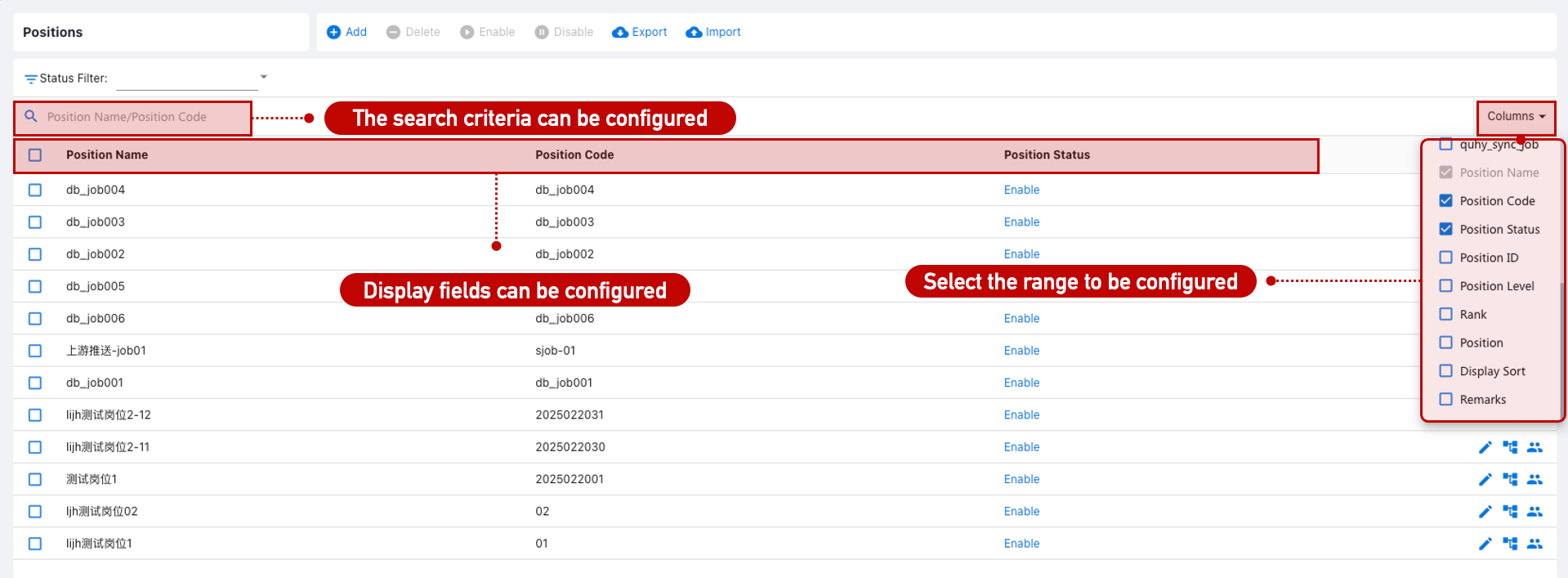
Position List Configuration
In the Identity Management > Position Management page, display and search attributes can be configured in Customization > Page List. Filtering by status is supported.
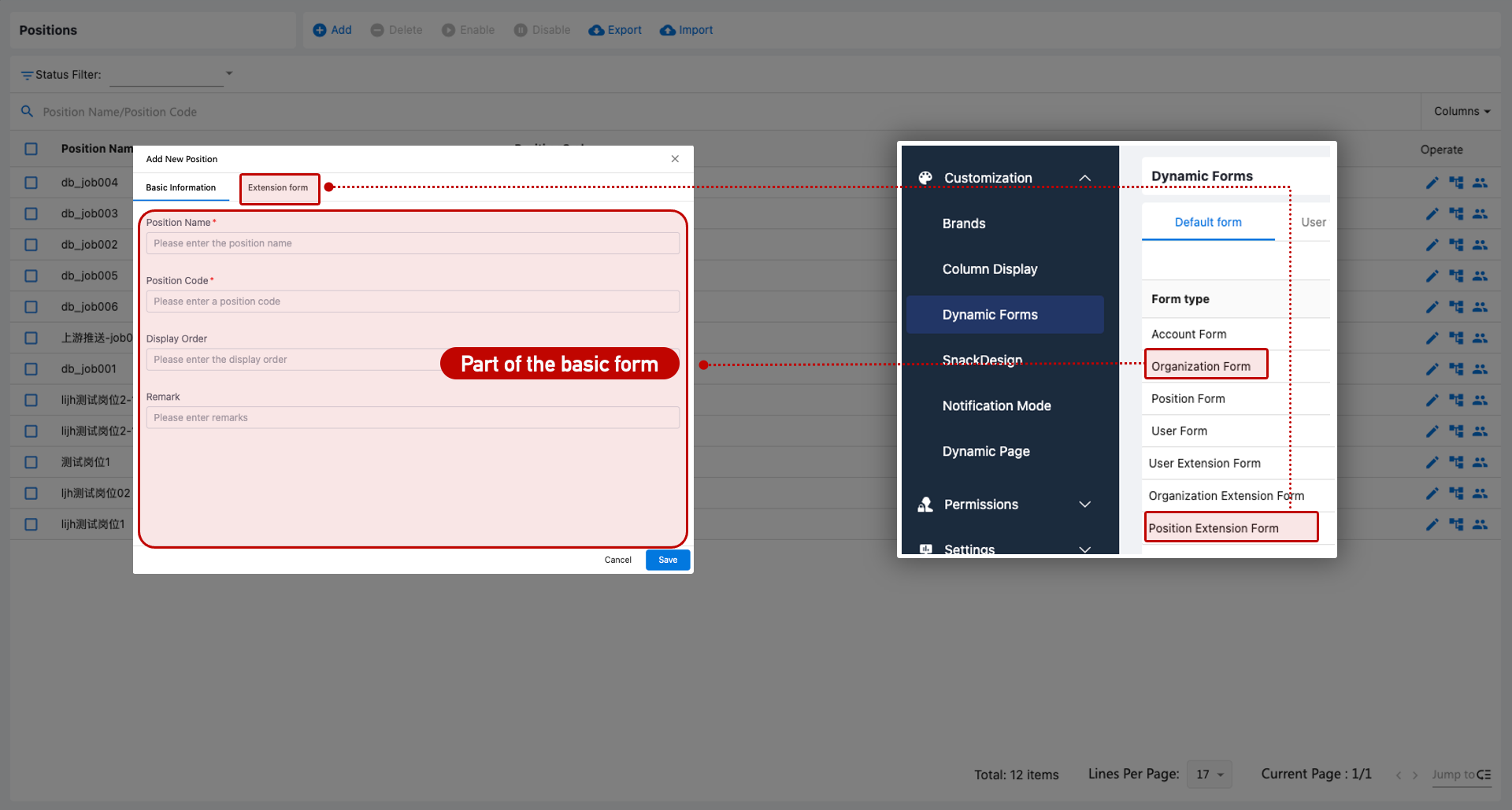
Position Form Configuration
Custom forms for positions are supported via Customization > Dynamic Forms.
Create Position
Positions can be created using the following methods:
| No. | Method | Description |
|---|---|---|
| 1 | Identity Source Sync | Created in upstream systems and synced to IAM. |
| 2 | Manual Creation | Manually created using the Create function. |
| 3 | Import | Batch imported using the Import function. |
If [Lifecycle Management] is enabled, new positions will be automatically synced to downstream systems. See Authorization Center.
Enable/Disable Position
| No. | Method | Description |
|---|---|---|
| 1 | Identity Source Sync | Upstream position status changes are synced to IAM. |
| 2 | Manual Operation | Use the Enable/Disable actions from the IAM console. |
Status changes will also apply to downstream systems if [Lifecycle Management] is enabled.
Delete Position
Be cautious—this action physically deletes the record.
| No. | Method | Description |
|---|---|---|
| 1 | Identity Source Sync | Deletion from upstream is synced to IAM via supported plugins. |
| 2 | Manual Operation | Use the Delete action manually in the IAM console. |
If [Lifecycle Management] is enabled, deletions will propagate to downstream systems. See Authorization Center.
Group Management
Groups are typically used in policy configuration to apply rules to specified sets of users, organizations, or positions. IAM supports both static and dynamic group types to provide flexible grouping capabilities.
| No. | Group Type | Description |
|---|---|---|
| 1 | Static Group | Members are manually added to the group. |
| 2 | Dynamic Group | Members are automatically selected using functions or SQL expressions. Use 1==1 to include all; use 1==0 to exclude all. |
Identity Source Management
The Identity Source module allows administrators to configure upstream data sources (e.g., OA systems, Beisen, WeChat Work) and define synchronization tasks. This enables IAM to receive user and organization data, solving issues of identity data silos.
Identity Source Basic Configuration
Before integration, ensure the corresponding plugin is uploaded in System Settings > Plugin Management.
| No. | Attribute | Description |
|---|---|---|
| 1 | Source Name | Arbitrary name, used for admin reference. |
| 2 | CRON | Default sync time is 2:00 AM daily. Adjustable. |
| 3 | Sync Only on Attribute Changes | If upstream data doesn't change for mapped fields, no sync occurs. Keep default unless needed. |
| 4 | Sync Failure Alerts | When enabled, alerts are sent on sync task failure (e.g., attribute mismatch, system error). See Notifications. |
Identity Source Sync Configuration
Choose the relevant plugin and configure required fields.
AD Sync Example
| Field | Description |
|---|---|
| IP or Hostname | IP of the AD server. |
| Port | Default is 389 (non-SSL) or 636 (SSL). |
| BaseDN | Root DN path under which queries and sync actions are executed. e.g., dc=example,dc=com. |
| Use SSL | Select "No" if certificate authentication is not needed. |
| Keystore Path | Required if SSL is enabled. |
| Keystore Password | Required if SSL is enabled. |
| Domain | AD domain name. |
| Username/Password | Credentials for AD binding. |
| Org/User Filter BaseDN | Further restricts scope of synced users or orgs. OU paths can be used. |
| Include Sub-orgs | Whether sub-units under specified BaseDN should be included. |
| Org/User Filter Condition | LDAP filter expression. |
For example, to sync a single OU:
(&(objectClass=organizationalUnit)(OU=Sales))To sync multiple:(&(objectClass=organizationalUnit)(|(OU=Sales)(OU=HR)))
Mapping of upstream fields to IAM fields can also be configured. For enumerated types, configure mappings via System Settings > Mapping Dictionary.
Manual Sync Execution
Admins can trigger identity source synchronization manually. Sync jobs run as scheduled tasks.
View Sync Logs
Each sync task's results can be audited in the sync logs. If sync alerts are enabled, alerts will be sent upon failure.
| Alert Level | Description |
|---|---|
| Level 1 | Sync task failed entirely (e.g., source unreachable). |
| Level 2 | Partial success (e.g., 10 orgs synced, 20 failed). |
Directory Services
IAM supports device access control through user authentication via IAM/MFA credentials. Users must authenticate to access hardware devices.
RADIUS Protocol
If the [RADIUS] module is purchased, IAM provides RADIUS-based access control using IAM credentials.
| Field | Description |
|---|---|
| IP | Device IP to match policy. |
| Shared Secret | Must match the secret configured on the device. |
| Auth Method | Specifies authentication success mechanism. |
| Charset | Ensures correct password encoding. |
| Application Binding | Only users with this app account can authenticate (optional). |
| Device Attributes | Define return value rules. |
LDAP Protocol
If the [LDAP] module is purchased, IAM can serve as an LDAP authentication source.
| Field | Description |
|---|---|
| Application Binding | Only users with this app account can authenticate (optional). |
| IP | Device IP for policy matching. |
| Admin Account | LDAP admin account. |
| Auth Method | Authentication method on client. |
| Charset | Ensures password compatibility. |